
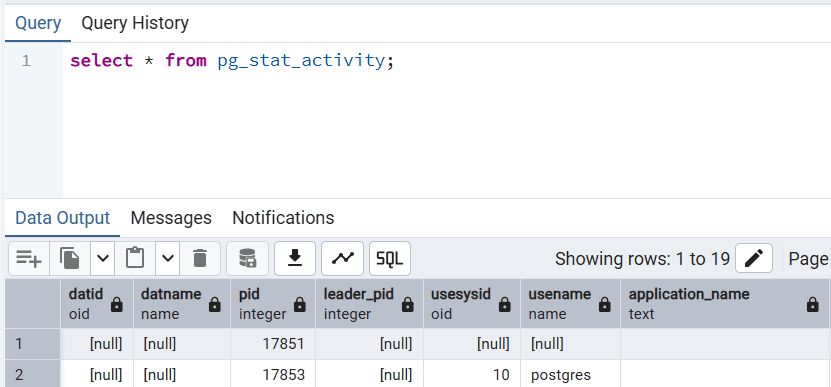
In the world of PostgreSQL performance tuning and PostgreSQL health checks, one view stands out as the heartbeat of your database: pg_stat_activity. It’s a live window into your PostgreSQL instance — showing every active, idle, or waiting session in real time.
If you care about PostgreSQL diagnostics, understanding this view is non-negotiable. This is where you see, in real time, what queries are running, who is blocking whom, and which connections are consuming your system’s resources.
Long-running query detection is a key part of a PostgreSQL Health Check: Complete Production Guide, especially when combined with lock analysis and performance tuning.
While pg_stat_activity helps detect current long-running queries and blocking, persistent performance trends are best analyzed with pg_stat_statements. See Understanding pg_stat_statements for PostgreSQL health checks for how to use that view in health analysis.
What is pg_stat_activity?
The pg_stat_activity view provides a real-time snapshot of all sessions currently connected to your PostgreSQL database.
It doesn’t store history — it shows the exact state at this moment.
Each row in the view represents a backend process (connection), and includes information like:
- The username and database name
- The query being executed
- When the query started
- Whether it’s waiting on a lock
- Its state (active, idle, idle in transaction, etc.)
You can think of it as PostgreSQL’s session dashboard, similar to the “Sessions” tab you see in pgAdmin 4.
pg_stat_activity vs pg_stat_statements
Many developers confuse these two system views, but they serve different purposes:
pg_stat_activity
- Shows a real-time snapshot of current sessions
- Displays the exact SQL text being executed
- Used for current session monitoring
pg_stat_statements
- Stores historical and cumulative query statistics
- Keeps normalized queries with placeholders
- Ideal for long-term performance analysis
- Aggregates data by the same
query_id
💡 Pro Tip:
You can join these two views on query_id to connect real-time query data with historical performance statistics.
This is especially useful for PostgreSQL diagnostics and query optimization.
Why pg_stat_activity Is Essential for PostgreSQL Health Checks
This view is the first place you should look when investigating any performance issue.
It tells you exactly what’s happening in your database — right now.
Here’s why it’s so powerful:
- Identifies long-running queries that may be slowing everything down
- Detects blocking sessions and deadlocks
- Monitors connection pool efficiency
- Helps prevent replication lag in HA setups
- Tracks idle connections that waste memory
In OLTP systems, even one or two long-running queries can severely degrade performance.
In streaming replication setups, they can delay the replication process, affecting high availability (HA).
That’s why every serious PostgreSQL health check should include this view as part of its diagnostics.
Key Columns You Should Understand
Here are the most important columns you’ll find in pg_stat_activity:
datname— Database nameusename— User executing the querypid— Backend process IDapplication_name— Name of the connected clientclient_addr— IP address of the clientstate— Current session state (active, idle, idle in transaction, etc.)query_start— When the query beganxact_start— When the transaction beganwait_event_type/wait_event— What the session is waiting on (locks, I/O, etc.)backend_type— Type of process (client backend, autovacuum, etc.)query— The exact SQL statement currently runningquery_id— Unique ID (used to join withpg_stat_statements)
These columns form the foundation of your PostgreSQL diagnostics toolkit.
How to Detect Long-Running Queries
One of the most common uses of pg_stat_activity is detecting queries that have been running too long.
Here’s how:
SELECT pid,
       now() - query_start AS duration,
       state,
       query
FROM pg_stat_activity
WHERE state = 'active'
ORDER BY duration DESC;
This gives you the list of currently running queries, sorted by duration. It’s often the first query every DBA runs when investigating a slowdown.
⚠️ Long-running queries can be the silent killers of database performance. They block other transactions, create contention, and even trigger replication lag.
Identifying Blocking and Blocked Queries
When multiple transactions are waiting on each other, performance quickly tanks. Here’s a useful diagnostic query:
SELECT blocked.pid AS blocked_pid,
       blocked.query AS blocked_query,
       blocking.pid AS blocking_pid,
       blocking.query AS blocking_query
FROM pg_stat_activity blocked
JOIN pg_stat_activity blocking
  ON blocked.wait_event_type = 'Lock'
WHERE blocking.state = 'active';
This helps pinpoint which query is blocking which, a vital part of PostgreSQL performance tuning.
Monitoring Idle and Idle-in-Transaction Sessions
Idle sessions may not be running queries, but they still consume memory and connections. Too many of them can indicate poor connection pooling or application issues.
SELECT pid, state, query_start, query
FROM pg_stat_activity
WHERE state LIKE 'idle%';
If you see hundreds of idle connections, it’s time to review your pooler settings (e.g., PgBouncer or pgpool-II).
Both too many active sessions and too many idle connections can cause performance degradation.
Safe Ways to Terminate Problematic Sessions
When you find a query consuming too many resources, you might want to stop it. But there’s a right way and a wrong way.
Never use:
kill -9 <pid>
This can terminate the entire PostgreSQL instance.
Instead, use PostgreSQL’s native functions:
Function Action
pg_cancel_backend(pid) --> Cancels the current query but keeps the session alive
pg_terminate_backend(pid) -->  Terminates the entire session safely
Examples:
SELECT pg_cancel_backend(12345);
SELECT pg_terminate_backend(12345);
Use these carefully, especially in production environments.
Using query_id for Advanced Diagnostics
Starting from PostgreSQL 13+, each running query in pg_stat_activity includes a query_id. This field allows you to trace that query across other subsystems - particularly pg_stat_statements and logs.
You can also make PostgreSQL include query_id in logs by adding this to your config:
log_line_prefix = 'queryid=%Q '
Why is this valuable?
Because if you also enable auto_explain, you can directly match the EXPLAIN output in your logs with the aggregated performance metrics in pg_stat_statements.
That’s gold for query optimization and root-cause analysis.
How pg_stat_activity Powers PostgreSQL Health Check Tools
Every serious PostgreSQL monitoring or health check tool relies on pg_stat_activity data to:
-Detect slow or blocking queries in real time
-Identify bottlenecks and connection spikes
-Measure concurrency levels and waiting behavior
-Spot inefficient application-side pooling
-Detect replication lag trends in streaming replication setups
In short:
pg_stat_activity is the foundation of PostgreSQL observability.
Ignoring it means ignoring the first signs of performance trouble.
When to Look at pg_stat_activity
You should monitor this view whenever:
-The database feels slow or unresponsive
-Queries are taking longer than usual
-Replication lag starts to increase
-CPU or memory usage spikes
-Locks and deadlocks are observed
Most PostgreSQL experts check this view before anything else — because it gives you instant visibility into the database’s real-time workload.
Practical Tips for PostgreSQL Performance Tuning
-Keep transaction durations short — don’t hold open idle-in-transaction sessions.
-Review long-running queries regularly.
-Use connection pooling effectively (avoid hundreds of idle backends).
-Always check blocking relationships before killing queries.
-Combine real-time (pg_stat_activity) and historical (pg_stat_statements) insights for holistic analysis.
Final Thoughts
pg_stat_activity is not just another system view — it’s PostgreSQL’s heartbeat. It reveals, in real-time, everything you need to know about how your database is behaving.
Mastering this view is the foundation of effective PostgreSQL health checks and performance diagnostics.
If you’re serious about PostgreSQL performance tuning, this table should be part of your daily workflow.
Author: Fırat Güleç — Principal PostgreSQL DBA
Try pghealth Free Today 🚀
Start your journey toward a healthier PostgreSQL with pghealth.
You can explore all features immediately with a free trial — no agent installation required